You send a snail mail letter from your laptop by writing it in your browser, uploading or typing it into an automated direct mail platform like thanks.io, entering a recipient’s address, and paying online — thanks.io prints, stuffs, stamps, and mails the physical letter for you. No printer, no envelopes, no trip to the post office. The whole thing takes a few minutes, and prices start around the cost of a first-class stamp.
This is a real letter. Paper, envelope, postage stamp, the USPS truck. The only part that changed is where the work happens: instead of your desk, it happens on ours. I built thanks.io because printing one letter — finding the envelope, licking the stamp, driving to the post office — is a fifteen-minute errand wearing a dollar-fifty costume. Here’s how to do it from a browser tab.
What are your options for sending physical mail from a computer?
There are three, and they’re not equal:
| Option | How it works | The catch |
|---|---|---|
| Print and mail it yourself | Word processor, printer, envelope, post office run | Your time, your printer jamming, your trip to the USPS counter |
| USPS Click-N-Ship / online postage | Buy postage online, still print the letter and envelope yourself | You still need a printer and a mailbox drop |
| Automated direct mail platform (thanks.io) | Write it online or upload a PDF, we print and mail it | None you’ll notice — that’s the point |
If you need to send exactly one letter per year and you own a functioning printer, the manual route is fine. For anything more frequent — client thank-yous, customer letters, follow-ups, personal correspondence you keep putting off — the platform route wins on time, every time.
What do you need before you start?
- A thanks.io account (free, includes $10 in credits)
- The recipient’s name and mailing address
- Your letter content — type it directly in the dashboard, or have a PDF ready if you want full layout control
- Optionally, an API key from API Settings if you want to automate the whole thing
How do you send a snail mail letter from your laptop, step by step?
- Create your account. Sign up free and you start with $10 in credits — enough to send several letters before you pay a cent.
- Write the letter. Type your message directly into the dashboard, or upload a PDF if you have a specific layout. No letterhead? A plain letter printed on clean paper looks more personal than most templates anyway.
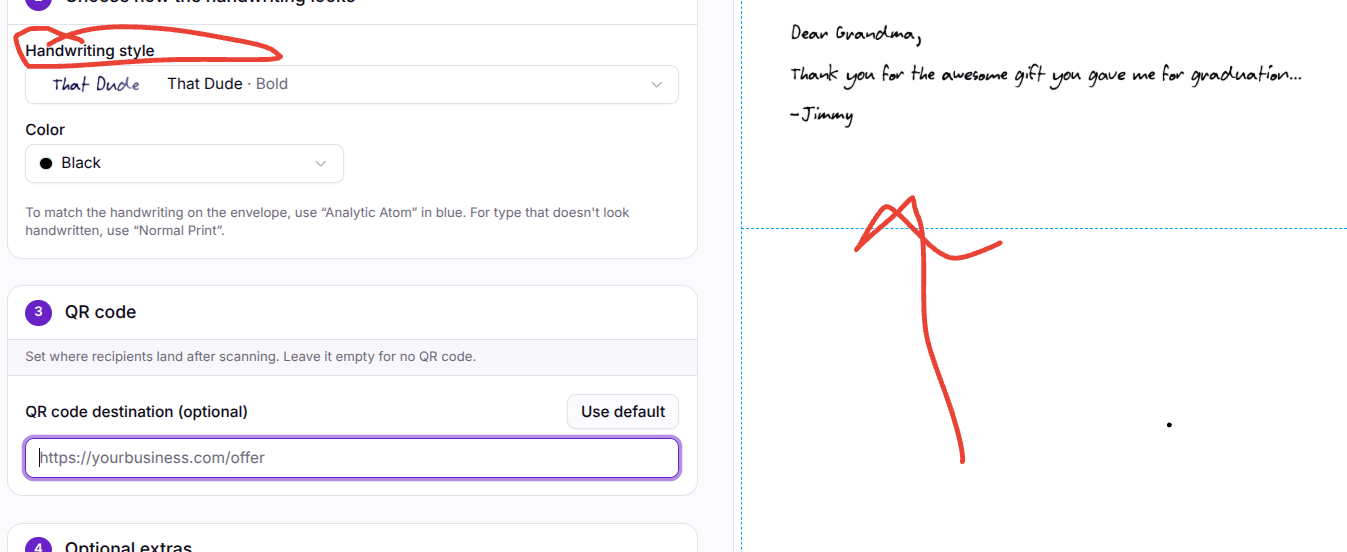
- Choose your style. Pick a printed font, or select a handwriting style that reads like you sat down and wrote it. Handwritten letters get opened and read — printed mailers get skimmed.
- Choose the envelope. Windowed letters show the recipient’s address through the envelope window; windowless letters have the address printed on the envelope itself, so your page gets the full canvas.
- Enter the recipient. Name and address, or save them to a mailing list for reuse. If you only have a name and a city, radius search can help you purchase verified address data (about $0.05 per record).
- Preview before you pay. Generate an order preview and actually read it. Check the signature, the address block, the tone. Thirty seconds here saves a stamped mistake.
- Send it. thanks.io prints, stuffs, stamps, and hands it to the USPS. It lands in the recipient’s mailbox as a real letter, typically within a few business days of print.
Can a letter sent from my laptop really look handwritten?
Yes — with an honest asterisk. thanks.io uses a handwriting-style font, engineered specifically to look like real pen strokes, at a fraction of what actual robotic handwriting costs. (We’re working on real pen strokes; the font is what ships today.) It’s not the fake cursive font your nephew used on a school poster in 1997 — the recipient sees a letter that looks handwritten, addressed by hand, with a real stamp. Either way, it works: handwritten-looking mail consistently outperforms printed mail on open rates, because the brain treats handwriting as personal before the conscious mind has a vote.
How much does it cost to send a letter without leaving your desk?
A letter on thanks.io starts around the cost of the stamp you’d have bought anyway. You’re not paying a premium for the convenience — you’re paying the stamp price and skipping the errand. Compare that honestly: your time driving to the post office, parking, waiting in line behind a man mailing forty packages of unknown contents. The math stops being close.
Can I send more than one letter at a time?
That’s where this stops being a convenience and starts being leverage. The same workflow scales to a mailing list of thousands — merge tokens, per-recipient AI-written copy, dynamic images, trackable QR codes. I cover the full pipeline in How Can I Personalize Direct Mail for Thousands of Customers? and the automation side in How Do I Connect an AI Agent to a Direct Mail API?
When does sending a letter from a laptop make the most sense?
- Business follow-ups — a thank-you letter after a sale or a meeting, sent the same day instead of “when I get to the post office” (never)
- Client and donor appreciation — letters that feel personal because they are
- Remote work realities — your laptop is your office; your printer is three states away
- Anything you’ve been meaning to mail — the thank-you note, the complaint letter, the letter to your congressperson. The friction was the excuse.
Is this a common problem, or just me?
Common. This exact question — How can I send a snail mail letter from my laptop? — has its own thread on Quora, and variants of it (from your phone, from your computer, without a printer) show up across Reddit and every productivity forum on the internet. The print-and-mail category exists because millions of people still need to send physical mail and simply don’t have a printer, stamps, or the patience anymore.
The post office didn’t go anywhere. Your errand did.
